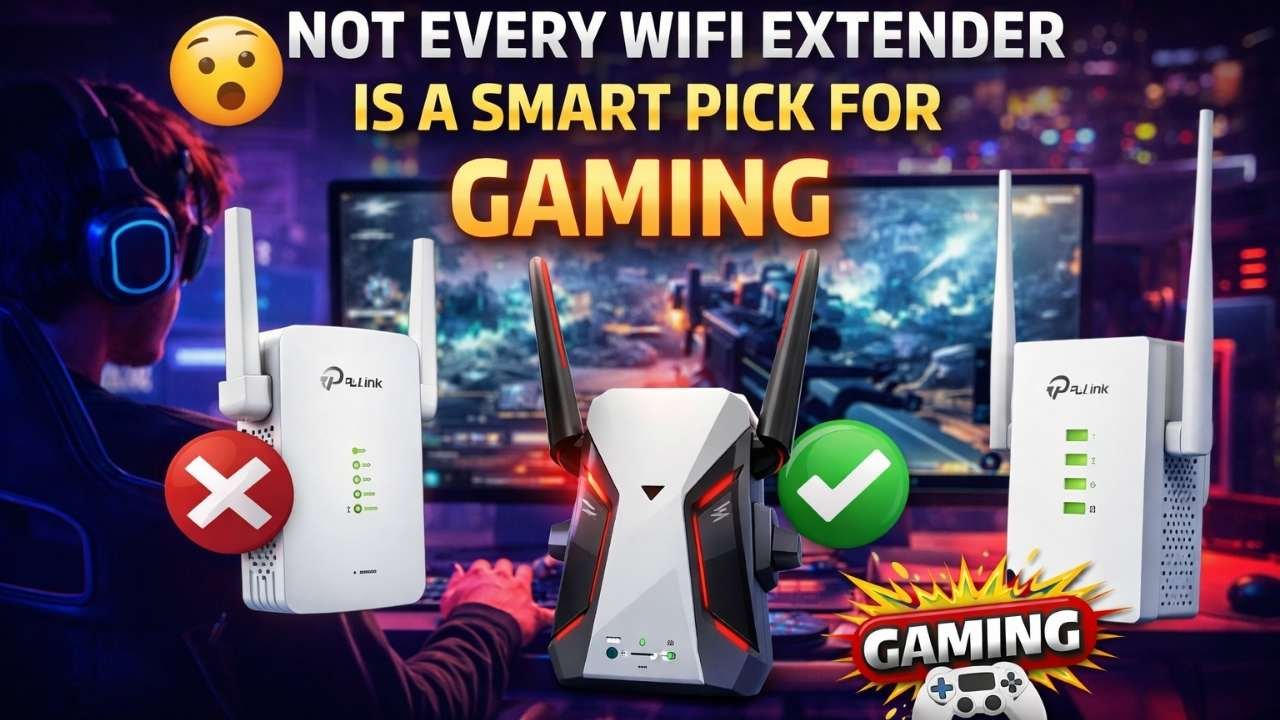
For most homes, the TP-Link RE715X AX3000 is the best place to start. It gives you a more current Wi-Fi 6 feature set than bargain extenders, but it does not push you into premium money unless your layout actually needs it.
For gaming, the real issue is usually not the speed class printed on the box. Placement, backhaul quality, and whether you can run Ethernet from the extender to the console or PC matter more in real use. A badly placed extender can still perform poorly, even if the marketing looks strong.
If your house is harder to cover or your network stays busy, the TP-Link RE815X is the stronger upgrade because its tri-band design gives it a clearer case for tougher setups. If you want a cleaner console or desktop connection, the TP-Link RE705X is the more practical Ethernet-first option. And if you are only fixing a modest weak spot, a smaller first-step model may be all you need.
Best WiFi Extender for Gaming at a Glance
| Product | Best For | Key Strength | Main Tradeoff / Value |
|---|---|---|---|
| TP-Link RE715X AX3000 Wi-Fi 6 Range Extender Check Price on Amazon | Most buyers who want a balanced gaming extender | Well-rounded Wi-Fi 6 option with EasyMesh support | A smarter middle ground than cheap extenders, but still a dual-band model rather than a tri-band step up |
| TP-Link RE815X AX5400 Wi-Fi 6 Range Extender Check Price on Amazon | Harder layouts and busier households | Tri-band design with separate 5 GHz backhaul | The premium pick in this group, but more than many smaller homes need |
| TP-Link RE705X AX3000 Wi-Fi 6 Range Extender Check Price on Amazon | Console or desktop setups using Ethernet from the extender | Gigabit Ethernet port and AP mode add real setup flexibility | Very useful in the right room, but the wireless link back to the router still matters a lot |
| NETGEAR Nighthawk EAX80 Wi-Fi 6 Mesh Range Extender Check Price on Amazon | Advanced users who want a more premium networking option | Higher-end positioning with strong capacity and wired-use appeal | Easy to overspend on if you are only fixing one weak room |
| NETGEAR EAX20 Wi-Fi 6 Mesh Range Extender Check Price on Amazon | Smaller homes and lighter gaming use | More approachable Wi-Fi 6 entry point from a known brand | Reasonable as a first step, but easier to outgrow |
Our Top Picks
TP-Link RE715X AX3000 Wi-Fi 6 Range Extender

Amazon Link: Check Price on Amazon
Best For: Buyers who want the safest all-around pick for a gaming room dead zone.
Why It Stands Out: This is the model for people who do not want to make the usual extender mistake in either direction. It is a step up from the low-end options that look cheap and easy until they disappoint, but it also stops short of premium territory unless your home really calls for it. On paper, the dual-band Wi-Fi 6 setup, EasyMesh support, and stronger overall positioning make it a sensible fit for the most common gaming problem: one room that needs a better connection without turning the whole project into a network rebuild.
- 𝐃𝐮𝐚𝐥-𝐁𝐚𝐧𝐝 𝐖𝐢𝐅𝐢 𝟔 𝐄𝐱𝐭𝐞𝐧𝐝𝐞𝐫 𝐰𝐢𝐭𝐡 𝟑 𝐆𝐛𝐩𝐬 𝐓𝐨𝐭𝐚𝐥 𝐁𝐚𝐧𝐝𝐰𝐢𝐝𝐭𝐡 - Extend your WiFi coverage with speeds up to 2404 Mbps (5 GHz band) and up to 574 Mbps (2.4 GHz band) for reliable 4K streaming and more. Performance varies by conditions, distance to devices, and obstacles such as walls.
- 𝐌𝐚𝐱𝐢𝐦𝐢𝐳𝐞𝐝 𝐂𝐨𝐯𝐞𝐫𝐚𝐠𝐞 𝐮𝐩 𝐭𝐨 𝟐𝟒𝟎𝟎 𝐒𝐪. 𝐅𝐭. - Two high-gain directional antennas with Beamforming technology enhance signal strength, reliability, and range, providing whole-home Wi-Fi coverage and eliminating dead zones for up to 64 devices.
- 𝐎𝐮𝐫 𝐂𝐲𝐛𝐞𝐫𝐬𝐞𝐜𝐮𝐫𝐢𝐭𝐲 𝐂𝐨𝐦𝐦𝐢𝐭𝐦𝐞𝐧𝐭 - TP-Link is a signatory of the U.S. Cybersecurity and Infrastructure Security Agency’s (CISA) Secure-by-Design pledge. This device is designed, built, and maintained, with advanced security as a core requirement.
- 𝐄𝐚𝐬𝐲𝐌𝐞𝐬𝐡-𝐂𝐨𝐦𝐩𝐚𝐭𝐢𝐛𝐥𝐞 - Easily expand your network for seamless, whole-home mesh connectivity by connecting the RE715X to any EasyMesh-compatible router.* Not compatible with mesh WiFi systems like Deco.
Key Buying Details:
- Wi-Fi 6 range extender with dual-band support
- Listed for up to 2400 sq. ft. of coverage
- Listed for up to 64 devices
- Speed listing includes up to 2404 Mbps on 5 GHz and up to 574 Mbps on 2.4 GHz
- Directional antennas with beamforming are mentioned
- EasyMesh is listed
Key Pros:
- Better overall balance than basic extenders
- Fits the most common home gaming weak spots well
- Easier to justify than a premium model for moderate layouts
Key Cons:
- Still a dual-band design, not a tri-band upgrade
- Less suited to tough layouts than the RE815X
Good Fit If: You want a Wi-Fi 6 extender that feels like a real upgrade, but you are not trying to solve a large or unusually difficult coverage problem.
Skip If: Your home layout is tricky, the network stays busy all day, or you already know you want tri-band.
Bottom Line: For most buyers, this is the easiest recommendation to make. It fixes the typical gaming-room problem without the trial-and-error feel of cheap extenders or the cost jump of a premium model.
TP-Link RE815X AX5400 Wi-Fi 6 Range Extender

Amazon Link: Check Availability
Best For: Buyers dealing with harder layouts, busier homes, or heavier gaming use.
Why It Stands Out: The reason to pay more here is not the bigger class number. It is the tri-band design with a separate 5 GHz backhaul. That matters when the extender has real work to do, especially in larger homes or places where walls and competing traffic make a dual-band model feel stretched. This is the shortlist pick for buyers who would rather spend once on the stronger option than buy a smaller model and wonder later why it still feels limited.
- 𝐓𝐫𝐢-𝐁𝐚𝐧𝐝 𝐖𝐢𝐅𝐢 𝟔 𝐄𝐱𝐭𝐞𝐧𝐝𝐞𝐫 𝐁𝐨𝐨𝐬𝐭𝐞𝐫 𝐰𝐢𝐭𝐡 𝟓.𝟒 𝐆𝐛𝐩𝐬 𝐓𝐨𝐭𝐚𝐥 𝐁𝐚𝐧𝐝𝐰𝐢𝐝𝐭𝐡 - Extend your router's WiFi coverage with speeds up to 2402 Mbps (Dual 5 GHz) and 574 Mbps (2.4 GHz). Performance varies by conditions, distance to devices, & obstacles such as walls.
- 𝐌𝐚𝐱𝐢𝐦𝐢𝐳𝐞𝐝 𝐂𝐨𝐯𝐞𝐫𝐚𝐠𝐞 𝐮𝐩 𝐭𝐨 𝟐𝟖𝟎𝟎 𝐒𝐪. 𝐅𝐭 - Four high-gain directional antennas and 6 powerful FEM with Beamforming technology boosts signal strength, reliability, and range, providing seamless whole-home Wi-Fi coverage and eliminating dead zones for up to 96 devices.
- 𝐎𝐮𝐫 𝐂𝐲𝐛𝐞𝐫𝐬𝐞𝐜𝐮𝐫𝐢𝐭𝐲 𝐂𝐨𝐦𝐦𝐢𝐭𝐦𝐞𝐧𝐭 - TP-Link is a signatory of the U.S. Cybersecurity and Infrastructure Security Agency’s (CISA) Secure-by-Design pledge. This device is designed, built, and maintained, with advanced security as a core requirement.
- 𝐖𝐨𝐫𝐤𝐬 𝐰𝐢𝐭𝐡 𝐎𝐧𝐞𝐌𝐞𝐬𝐡 - Easily expand your network for seamless, whole-home coverage by connecting your RE815X to any TP-Link OneMesh compatible router. Not compatible with mesh systems like Deco.
Key Buying Details:
- Tri-band Wi-Fi 6 range extender
- Listed as a 5.4 Gbps class extender
- Listed for up to 2800 sq. ft. of coverage
- Listed for up to 96 devices
- Separate 5 GHz backhaul is mentioned
- Ethernet port and app setup are mentioned in listing context
Key Pros:
- Strongest premium positioning in this roundup
- Better fit for difficult layouts and heavier network use
- Less likely to feel undersized in a busy home
Key Cons:
- Likely more than many buyers need
- Hard to justify for a simple one-room signal issue
Good Fit If: You are trying to fix a real coverage problem, not just chase a nicer number on the box.
Skip If: You only need to clean up one modest dead zone and do not want to pay extra for headroom you may never use.
Bottom Line: This is the premium answer in the group. It makes the most sense when the home is the problem, not when the shopping list is.
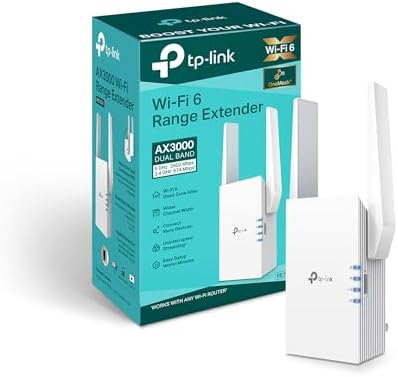
TP-Link RE705X AX3000 Wi-Fi 6 Range Extender
Amazon Link: View on Amazon
Best For: Console or desktop gamers who want to plug the device into the extender by Ethernet.
Why It Stands Out: Some buyers do not just need better signal in the room. They need a cleaner path from the extender to the actual gaming device. That is where this model makes the most sense. The Gigabit Ethernet port gives it a more practical role in a bedroom, office, or gaming corner, and AP mode adds flexibility if your setup changes later. It is easier to picture how this one fits into a real desk or console layout than with a lot of vague “gaming” extenders that never explain the connection path.
- Dual Band WiFi 6 - Separates 5 GHz (2402 Mbps) and 2.4 GHz (574 Mbps) WiFi bands for faster speeds and greater capacity with the latest technology
- Uninterrupted Streaming - Easily create a TP-Link OneMesh network for seamless whole home WiFi coverage
- AP Mode - Create a new WiFi access point through the Gigabit Ethernet port to enhance your wired network with WiFi capability
- Gigabit Ethernet Port - Provides high-speed wired access, ideal for smart TVs, PCs, and game consoles
Key Buying Details:
- Wi-Fi 6 range extender with dual-band support
- Speed listing includes up to 2402 Mbps on 5 GHz and up to 574 Mbps on 2.4 GHz
- Gigabit Ethernet port is listed
- OneMesh support is listed
- AP mode is specifically listed
- Suitable for wired access through the Ethernet port
Key Pros:
- Strong fit for console or desktop gaming corners
- Ethernet support gives it a clearer real-world use case
- AP mode adds flexibility beyond basic extender use
Key Cons:
- Still depends on the wireless link back to the router
- Not the best answer for tougher multi-wall layouts
Good Fit If: You care as much about how the console or PC connects in the room as you do about the extender itself.
Skip If: You are not going to use the Ethernet advantage and your bigger issue is a harder whole-home layout.
Bottom Line: This is the most useful pick for buyers who plan to place the extender well and wire into it. In the right room, that can matter more than buying a bulkier model with a bigger headline number.
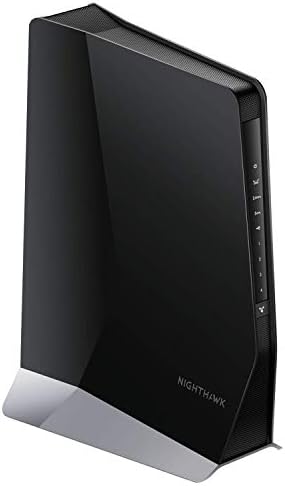
NETGEAR Nighthawk EAX80 Wi-Fi 6 Mesh Range Extender
Amazon Link: Check Price on Amazon
Best For: Advanced users who want a higher-end extender from a more premium-leaning line.
Why It Stands Out: This is not the value pick, and it is not trying to be. It is here for buyers who already understand their network problem and want a more serious extender from a premium networking lineup. The stated coverage, capacity, and wired-use angle give it a different identity from the smaller models in this roundup. For the right buyer, that makes sense. For someone just trying to fix one weak gaming room, it can be an easy way to spend too much.
- EXTENDED WIRELESS COVERAGE: Adds WiFi range coverage up to 2,500 sq. ft., and connects up to 30 devices such as laptops, smartphones, speakers, IP cameras, tablets, IoT devices, and more.
- SEAMLESS SMART ROAMING: Uses your existing network SSID name so you never get disconnected as you move around your home or office
- AX6000 WiFi SPEED: Provides up to 6Gbps performance using Dual-Band WiFi technology for heavy-duty 4K HD streaming and multi-player gaming.
- UNIVERSAL COMPATIBILITY: Works with any wireless router, gateway, or cable modem with WiFi, and is optimized for all WiFi 6 routers.
Key Buying Details:
- Wi-Fi 6 mesh range extender
- Listed to add up to 2500 sq. ft. of coverage
- Listed to connect 30+ devices
- AX6000 class / 6 Gigabits per second listing language
- Dual-band 802.11ax is listed
- Compatibility with any Wi-Fi router is listed
- Wired connections and seamless smart roaming language appear in listing context
Key Pros:
- Premium option for buyers who want a stronger networking posture
- Broader device capacity for heavier households
- More appealing to advanced users than budget-first shoppers
Key Cons:
- Easy to overspend on for a simple weak-room fix
- Less approachable than smaller options
Good Fit If: You already know an extender belongs in your setup and you want something that feels closer to the higher end of the category.
Skip If: You mainly want a straightforward upgrade for one room and do not need the extra ambition.
Bottom Line: This is the pick for buyers who shop like network enthusiasts, not casual fix-it shoppers. It deserves a place here, but it is also the easiest model in the roundup to buy for the wrong reason.
NETGEAR EAX20 Wi-Fi 6 Mesh Range Extender

Amazon Link: View on Amazon
Best For: Smaller homes or buyers who want a first-step Wi-Fi 6 extender without paying for premium hardware.
Why It Stands Out: Not every gaming setup needs a big upgrade. This one fits buyers who have a smaller space, lighter network demands, or a single weak area that does not justify a stronger model. It gives you a more accessible entry into Wi-Fi 6 extender shopping from a familiar brand, but it also comes with a lower ceiling. That tradeoff is fine when the problem is modest. It is less fine when the network is already busy or the layout is working against you.
- EXTENDED WIRELESS COVERAGE: Adds WiFi range coverage up to 1,500 sq. ft., and connects up to 20+ devices such as laptops, smartphones, speakers, IP cameras, tablets, IoT devices, and more.
- SEAMLESS SMART ROAMING: Uses your existing network SSID name so you never get disconnected as you move around your home or office.
- FAST WiFi 6 PERFORMANCE: AX1800 speed (up to 1.8Gbps) using Dual-Band WiFi technology (up to 600 + 1200 Mbps), and 4 simultaneous streams provides more capacity so more devices can use WiFi at the same time.
- UNIVERSAL COMPATIBILITY: Works with any wireless router, Gateway, or cable modem with WiFi, and is optimized for all WiFi 6 routers. Compatible with existing WiFi devices and new WiFi 6 devices like iPhone 11.
Key Buying Details:
- Wi-Fi 6 mesh range extender
- Listed to add up to 1500 sq. ft. of coverage
- Listed for 20+ devices
- Listed for up to 1.8 Gbps speed
- Uses the existing network SSID for seamless smart roaming
- Positioned as a smaller-range Wi-Fi 6 mesh extender
Key Pros:
- More approachable entry point than premium models
- Practical for smaller homes and lighter gaming use
- Sensible branded choice for a first Wi-Fi 6 extender
Key Cons:
- Lower ceiling than the stronger TP-Link and Nighthawk options
- Easier to outgrow in busier households
Good Fit If: You want to clean up one moderate dead zone and keep the upgrade simple.
Skip If: You game heavily, share the network with lots of devices, or want more room to grow.
Bottom Line: This is the lighter-duty pick in the roundup. It can be the right answer for a small home, but it is not the model to buy when you already know your setup needs more help than that.
Best WiFi Extender for Gaming by Use Case
- Best Overall: TP-Link RE715X AX3000 — the most balanced choice for buyers who want a strong Wi-Fi 6 extender without drifting into premium overkill.
- Best Premium: TP-Link RE815X AX5400 — the better fit for harder layouts and busier homes where tri-band design matters.
- Best for Gaming Console by Ethernet: TP-Link RE705X AX3000 — the most practical pick when the console or desktop will plug into the extender.
- Best for Advanced Users: NETGEAR Nighthawk EAX80 — a better match for buyers who already think in broader networking terms.
- Best Budget-Friendly Branded Option: NETGEAR EAX20 — a reasonable first step for smaller spaces and lighter needs.
Side-by-Side Comparison of the Top Picks
| Product | Best Use Case | Key Strengths / Ease of Use | Main Tradeoff / Value |
|---|---|---|---|
| TP-Link RE715X AX3000 Wi-Fi 6 Range Extender Check Price on Amazon | Balanced choice for most gaming dead zones | Modern Wi-Fi 6 feature set, EasyMesh support, and stronger everyday value than basic extenders | The safest middle-ground option, but not as specialized as a tri-band premium model |
| TP-Link RE815X AX5400 Wi-Fi 6 Range Extender Check Price on Amazon | Demanding setups and harder home layouts | Tri-band design and separate 5 GHz backhaul give it the clearest premium case | Stronger for difficult setups, but more than modest weak-room problems usually need |
| TP-Link RE705X AX3000 Wi-Fi 6 Range Extender Check Price on Amazon | Console and desktop setups using Ethernet from the extender | Gigabit Ethernet and AP mode make it easier to fit into real gaming room layouts | Very useful in the right setup, but the result still depends on upstream signal quality |
| NETGEAR Nighthawk EAX80 Wi-Fi 6 Mesh Range Extender Check Price on Amazon | Advanced users wanting a higher-end branded option | Premium-class positioning, broader capacity, and stronger enthusiast appeal | Easy to overspend on if your actual problem is modest |
| NETGEAR EAX20 Wi-Fi 6 Mesh Range Extender Check Price on Amazon | Smaller homes and lighter gaming needs | Approachable branded entry point with simpler upgrade intent | Lower ceiling than the stronger TP-Link and Nighthawk options |
The main split is fairly clear. The RE815X is the only model here with a strong tri-band story, while the RE705X stands out when Ethernet to the gaming device is part of the plan. The RE715X stays in the middle as the safest recommendation for most buyers, and the two NETGEAR models divide into entry-level first step versus premium enthusiast option.
What Actually Matters Before You Buy
Backhaul quality matters more than marketing. An extender is only as useful as the connection it can keep with the main router. That is why tri-band can matter more than a flashy speed label in a harder layout.
Placement can make or break the result. If you put the extender where the router signal is already weak, you are just repeating a weak connection. For gaming, it needs to sit in a spot where the upstream signal is still strong enough to work with.
Ethernet can change which model makes sense. If your console or desktop can plug into the extender, a model like the RE705X may be a better buy than a faster-looking option that does not fit the room as well.
Coverage claims do not tell the whole story. Square-foot numbers can look great on a product page, but walls, floors, interference, and network traffic all affect real use.
Sometimes an extender is not the best answer. If the router signal is already weak by the time it reaches the midpoint, a mesh system, wired backhaul, MoCA, or access point may be the smarter upgrade path.
What Most Buyers Get Wrong
- Buying a “gaming booster” instead of a better extender: A lot of buyers shop by marketing terms instead of checking the Wi-Fi generation, band design, and room fit.
- Paying for class numbers alone: A bigger number on the box does not automatically mean a better gaming result. Placement and Ethernet use often matter more.
- Ignoring how the console or PC will connect: In some setups, the right Ethernet-friendly extender matters more than a broader spec sheet.
- Assuming every dead zone should be fixed with an extender: Some homes are better served by mesh, access points, or wired upgrades. An extender is a compromise tool, not a cure-all.
Setup, Compatibility, and Expectation Notes
Gaming extender choices depend heavily on placement quality, upstream router signal strength, Ethernet use, and the tradeoff between dual-band and tri-band designs. The right pick is not the one with the biggest number. It is the one that fits the room, the router, and the gaming device.
No extender here should be treated as a guaranteed lag fix. Better hardware can help, but this category is still about managing limits. If the extender is placed badly or the source signal is already weak, even a stronger model can fall short.
Compatibility matters, and so does setup quality. It makes more sense to think of an extender as one part of the network path, not as a magic box that overrides every weakness in the home.
How to Use a WiFi Extender for Gaming at Home
- Decide first whether the gaming device will connect wirelessly or by Ethernet to the extender.
- Place the extender where it still gets a healthy signal from the main router, not at the far edge of the dead zone.
- For tougher layouts, prioritize stronger backhaul design over inflated coverage claims.
- If your setup allows it, connect the console or desktop to the extender by Ethernet for a cleaner room-level connection path.
- If the router signal is already too weak halfway there, stop forcing the extender route and consider mesh, MoCA, or a wired access point instead.
How We Chose These Picks
These picks were based on the verified shortlist, listed product specifications, practical buyer-fit logic, and the tradeoffs already reflected in the handoff. We compared Wi-Fi 6 positioning, dual-band versus tri-band design, Ethernet usefulness, stated coverage and device-capacity ranges, and how each model fits common gaming setups.
We also focused on which extenders make sense for different room and network realities instead of treating every model as equally suitable. This roundup does not rely on unverified buyer-review themes or unstable price claims. The emphasis here is on fit, design logic, and setup value.
Final Verdict
For most buyers, the TP-Link RE715X AX3000 Wi-Fi 6 Range Extender is the right starting point. It fits the most common gaming dead-zone problem without pushing you into premium territory too soon.
If your home is harder to cover, the network stays busy, or you already know you need a stronger backhaul story, move up to the TP-Link RE815X AX5400 Wi-Fi 6 Range Extender. If your setup is really about placing the extender well and plugging a console or desktop into it, the TP-Link RE705X AX3000 Wi-Fi 6 Range Extender is the better fit.
The best wifi extender for gaming is usually not the one with the flashiest label. It is the one that matches your layout, your connection path, and the way you actually play.
FAQ
Does a WiFi extender help with gaming?
It can help when the main problem is weak signal in the gaming room. It is not a guaranteed lag fix, because placement and upstream router strength still matter.
Is tri-band better than dual-band for gaming?
In tougher layouts, tri-band can be a real advantage because it gives the extender a better backhaul story. In simpler homes, a good dual-band model may be enough.
Should I connect my console or PC to the extender by Ethernet?
If the extender supports it and placement is good, Ethernet from the extender to the gaming device can make more sense than relying on a second wireless hop to the device.
Can a WiFi extender replace a mesh system?
Not always. Some homes are better served by mesh, MoCA, or a wired access point, especially when the router signal is already weak where the extender would need to sit.
What is the most balanced pick in this roundup?
The TP-Link RE715X is the safest middle-ground option for most buyers because it offers a stronger spec balance than entry-level choices without assuming every setup needs a premium tri-band model.
What is the best choice for console gaming?
The TP-Link RE705X is the better pick if you want to connect the console by Ethernet to the extender, which can be a smarter real-world fit than shopping only by headline speed class.
